Friskription → Blog → Korean
How to watch Korean streams and shows in English
Korean streaming has moved to platforms that were never built with an international audience in mind. None of them caption, none of them translate, and the audio is the only thing you can work from.
The short answer
- Korean streaming platforms do not caption. Chzzk and SOOP carry no caption track, so there is nothing for a subtitle translator to read.
- YouTube's Korean auto-captions exist for recorded uploads, but they are frequently absent on lives, and auto-translate inherits every mistake they make.
- Transcribing the audio is the route that works. Friskription listens to the tab and draws an English translation over the video.
- Korean is spoken quickly and drops subjects freely, so set the pacing to Balanced or Precise — a translator that waits for the pause produces far better Korean-to-English lines than one that does not.
- Put streamer names and honorific nicknames in the glossary. Thirty minutes a week are free.
Where Korean content actually lives now
Korean streaming has fragmented. Twitch's withdrawal from Korea moved a large part of the audience to Chzzk, Naver's platform, and to SOOP, the renamed AfreecaTV. A lot of content still goes up on YouTube, and broadcaster sites carry shows, news and variety.
What they have in common is that none of them was designed for viewers who do not read Korean. There is no caption track to translate, no subtitle menu to change, and no browser extension can conjure text that the platform never produced. On YouTube the picture is better for recorded uploads and considerably worse for lives.
Getting English subtitles on a Korean stream
-
Install the extension and sign in
Add Friskription to Chrome and sign in with Google. Thirty minutes of live subtitles every week are free, refilled each Monday, with no card and no AI provider accounts.
-
Set the target language to English
Korean does not need selecting as the source — the spoken language is detected, which also covers a stream that mixes Korean and English, as gaming streams routinely do.
-
Set the pacing to Balanced or Precise
This matters more for Korean than for most languages, and the next section explains why. Quick is the wrong default here.
-
Open the stream and press start
Lines land within a few seconds. Drag the overlay clear of the webcam and the chat, set the size once, and it is remembered for that site.
What Korean does to a live translator
The verb arrives last
Korean puts the verb at the end of the sentence, and the verb is where the negation, the tense and a good deal of the meaning live. A translator working phrase by phrase is guessing at the shape of a sentence it has not heard the end of — which is precisely why a preset that waits for the natural pause produces noticeably better English here than one optimised to put words up fast.
Subjects are dropped constantly
Korean omits the subject whenever context supplies it, which in conversation is most of the time. Working out whether a line means "I did" or "you did" or "they did" requires reading it against what came before. A translator that treats each line as an isolated string cannot do this; one that reads each line in the context of the previous ones usually can, and this is the single biggest quality difference you will notice.
Honorifics do not survive intact
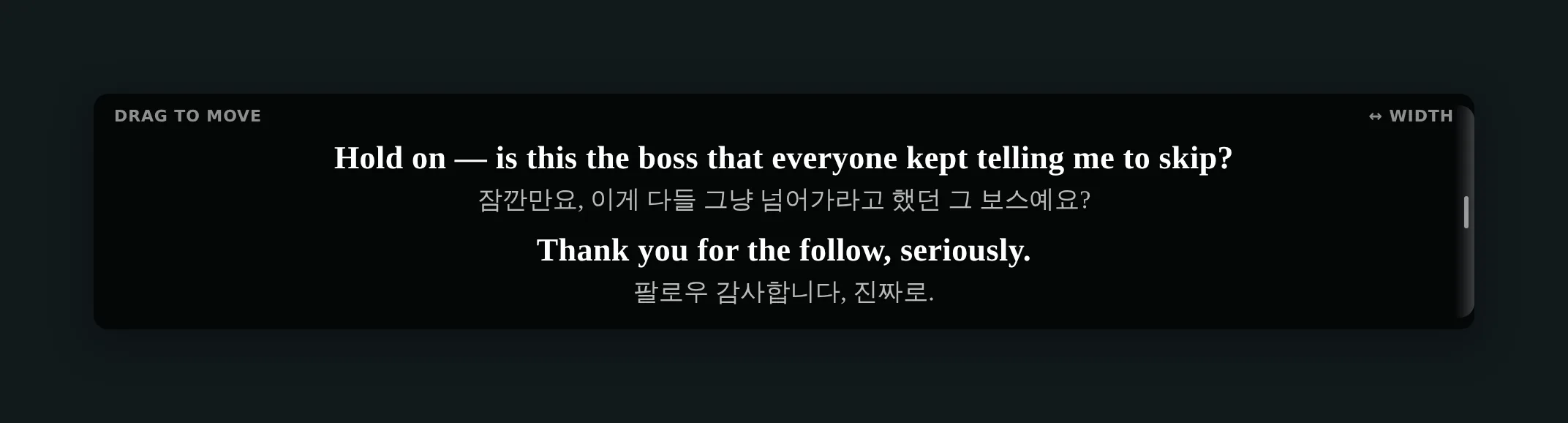
Speech levels, 형/오빠/언니/누나, and the whole register system carry social information English has no direct equivalent for. A translation either drops it or renders it awkwardly. Turning on the original-language line is worth it here: each cue shows the translation with the Korean beneath it, so the register is visible even where the English cannot express it.
Names need pinning
Streamer handles, nicknames and the honorific forms built on them are the words a transcript mangles most. Put them in the glossary once and the spelling stays fixed for the session instead of being re-guessed every time somebody says it.
Keeping up with the speed
Korean variety and gaming streams are spoken fast, and a fast stream is where the one-to-three-second delay of any live translator is felt. Two things help.
Sync mode holds playback back a few seconds and processes the audio ahead of what you are watching, so the subtitle arrives with the words instead of after them — picture, sound and text stay together. It is unlocked permanently by the one-time $1.99 starter pack. Speaker labels handle the other common case: a Discord call with four people talking over each other, where the problem is not speed but working out who said what.
Dramas, variety shows and files
A drama or a variety episode you have on disk should not be subtitled live. Put the file into the media studio, which reads it in the browser and gives back an SRT or VTT you keep — you can read the lines through before watching, fix a name, and shift the timing if it drifts. The file never leaves your computer. There is a full walkthrough.
Questions
Do Chzzk or SOOP have English subtitles?
No. Neither platform produces a caption track, so there is nothing to translate and no subtitle menu to change. Subtitles have to come from transcribing the audio on your own side.
Can I watch a Korean stream in English on Chzzk?
Yes — a Chzzk stream is a tab playing sound, which is all a transcribing overlay needs. Install the extension, set English as the target language, and press start on the tab.
How good is Korean to English translation in practice?
Good enough to follow a stream comfortably. It is strongest on ordinary conversation and weakest on puns, wordplay and community slang. Setting the pacing to Balanced or Precise helps a great deal, because Korean puts the verb at the end and a translator that waits for it has much more to work with.
Can I see the Korean as well as the English?
Yes. Turn on the original-language line and each cue shows the translation with the Korean beneath it. This is worth doing if you are learning, and it is the practical answer to honorifics and speech levels that English cannot carry.
Does it work on Korean dramas and TV?
On anything playing in a Chrome tab, yes. Note that Sync mode cannot run on DRM-protected sites; the standard presets work there as usual. For a file you already have, the media studio produces a subtitle file you can keep.
Will it handle a stream that switches between Korean and English?
Yes. The spoken language is detected rather than set, so a streamer switching mid-sentence is handled without you touching a setting.
What does it cost?
Thirty minutes of live subtitles every week are free and refill each Monday, with no card and no AI accounts. Past that, one-time packs run from $1.99 for 90 minutes to $24.99 for 1,440. Only speech is billed and minutes never expire.
Watch the next Korean stream in English
Thirty free minutes every week. No card, no AI accounts.
Add it to Chrome