Friskription → Blog → VTubers
How to watch Japanese VTuber streams in English
Translation in chat depends on someone being awake, in the right stream, in a good mood. Your own subtitles are there every time, on every channel, including the small ones nobody clips.
The short answer
- VTuber streams on YouTube and Twitch almost never carry an English caption track, so there is nothing for a subtitle translator to read.
- Live translators in chat are volunteers. They cover the big streams, at the popular hours, when someone happens to be free.
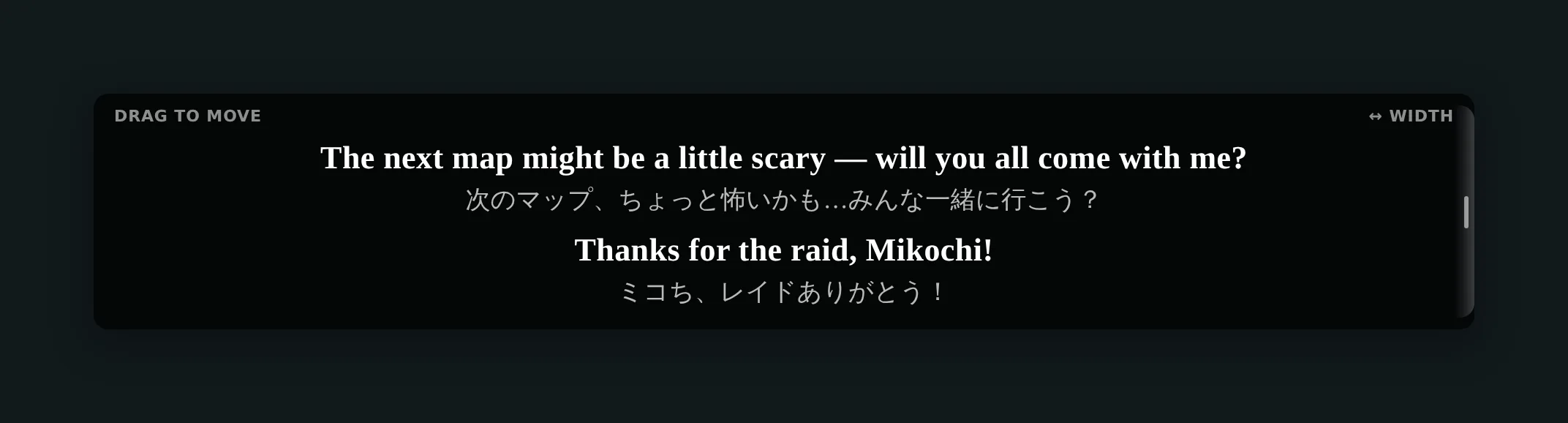
- Your own subtitles do not depend on any of that. Friskription transcribes the stream's audio and draws an English translation over the video.
- Put the talent's name, the fanbase name and the recurring bits in the glossary once, and they stay spelled correctly for the whole stream.
- Thirty minutes a week are free. Speaker labels keep collabs readable when four people are talking over each other.
Why chat translation keeps letting you down
Volunteer live translators do remarkable work, and there are simply not enough of them. They cluster around the largest channels, at the hours most of their audience is awake. A mid-size streamer at four in the morning your time, a sudden unarchived karaoke, a small indie channel with three hundred viewers — those are the streams that never get a TL, and they are usually the ones where you most wanted one.
Even on a well-covered stream, chat translation is a summary. Someone reads a line, decides whether it is worth relaying, types an abbreviated version, and it arrives in a scrolling chat window that is also carrying four hundred emotes. It is enormously better than nothing, and it is not the same as reading what was said.
And the platform will not help. YouTube's auto-translate needs a caption track to translate; on a live Japanese stream there usually is not one, and on Twitch there never is. The audio is the only source of text available.
Setting up your own subtitles
-
Install the extension and sign in
Add Friskription to Chrome and sign in with Google. It opens with thirty free minutes of live subtitles a week, refilled every Monday, with no card and no accounts at any AI provider.
-
Set the target language to English
Or to any of the other fourteen — Chinese, Korean, Spanish, Portuguese and Indonesian are all well represented in VTuber audiences. Japanese does not need selecting as the source; the spoken language is detected, which also means a stream that drifts into English for a sponsor read is handled without a setting change.
-
Open the stream and press start
Subtitles appear over the video a few seconds in. Drag the box below the model so it does not cover the face, and set the size once — it is remembered for that site.
-
Fill in the glossary before the good part
This is the step that makes the difference, and the next section is about nothing else.
The glossary is the whole game
Speech recognition is weakest exactly where VTuber streams are densest: proper nouns. A talent's name, the fanbase name, the greeting, the catchphrase, the name of a character in the game — these are words the model has the least context for, and it will guess, and it will guess differently each time.
The glossary pins a spelling for the session. Add the entries once for a channel you watch and the stream stops renaming everyone every ten minutes.
Worth adding for any channel you watch more than once:
- The talent's name, and the nickname the fans actually use, which is often not the same thing.
- The fanbase name and the greeting the stream opens with.
- Names of frequent collab partners — these come up constantly and are exactly the words a transcript mangles.
- Game-specific terms, especially character and item names in a language that is not the one being spoken.
- Running jokes that are a single made-up word. There are always several.
Collabs, karaoke and the other awkward cases
Collabs: turn on speaker labels
Four people on a call, all interrupting each other, is the fastest way to make subtitles useless — you get a continuous stream of sentences with no idea who is saying them. Speaker labels distinguish up to five voices and mark each line, which is normally the difference between following a collab and switching it off.
Karaoke: expect less, and that is fine
Singing is hard for speech recognition in a way speech is not: the vowels are held, the rhythm is the music's rather than the language's, and there is a backing track competing with the voice. Talking segments between songs transcribe normally. For the songs themselves, a translated lyric is a bonus rather than something to count on.
Long streams: keep an eye on the balance
A six-hour endurance stream will outlast thirty free minutes. Only speech is billed, so the waiting screen and the long silences cost nothing, and the control panel shows an estimate of what is left. If you know it will be a long one, a minute pack is a one-time purchase rather than a subscription — the minutes sit there until you use them.
Unarchived streams: there is no second chance
If a stream is not going to be archived, the transcript export is worth knowing about: it saves the session's lines to a file while it runs, so an unarchived karaoke or a members' stream leaves you with something afterwards.
How good is the translation, honestly
Good enough to follow a stream comfortably, and not a substitute for a fluent speaker. Two things drive that. The transcript comes from a production speech-recognition model — ElevenLabs Scribe v2, which publishes a 3.3% word error rate on English benchmarks — and everything downstream is capped by how well the words were heard in the first place. The translation is then done by a language model that reads each line against the lines before it, which is why it handles a sentence that continues from the previous one better than a phrase-by-phrase translator does.
Where it is weakest is exactly where a human TL shines: a joke that depends on a pun, a reference to something that happened three streams ago, a piece of slang the community invented last week. Those are the moments chat is for. What you get is the other ninety per cent — the actual content of the stream, as it happens, in a language you read.
Questions
Can I watch Hololive and Nijisanji streams with English subtitles?
Yes. The subtitles are generated on your side from the stream's audio, so they work on any channel on YouTube or Twitch regardless of agency, size or whether anyone is translating in chat.
Does it work on unarchived and members-only streams?
Yes — if the tab is playing sound, it can be subtitled, and a members-only stream you are logged in for is just a tab playing sound. The transcript export is especially worth using on unarchived streams, since there will be no VOD to go back to.
How do I stop it from misspelling a talent's name?
Add it to the glossary. That pins the spelling for the session, so the name stops being re-guessed every time it is said. Add collab partners and the fanbase name at the same time — they are the other words that get mangled most.
Will it keep up with a fast talker?
Yes. Set the pacing preset to Quick, which favours short lines that land promptly over full sentences that land a beat later. Sync mode goes further: it holds playback back a few seconds so the line arrives with the words instead of after them.
Can it translate the songs in a karaoke stream?
Partly. Singing is much harder to transcribe than speech — held vowels, a backing track, and a rhythm that is the music's rather than the language's. Talking segments transcribe normally; treat translated lyrics as a bonus.
Does the streamer know I am using it?
No. Everything happens in your own browser, from audio the tab is already playing. Nothing is sent to the channel and nothing appears in chat.
What does it cost for a long stream?
Thirty minutes every week are free and refill each Monday. Only speech is billed, so waiting screens and silences cost nothing. Past that, a one-time $1.99 starter pack adds 90 minutes and packs run to $24.99 for 1,440 minutes — one-time purchases, never a subscription, and the minutes do not expire.
Watch the next stream in English
Thirty free minutes every week. No card, no AI accounts.
Add it to Chrome